What’s running
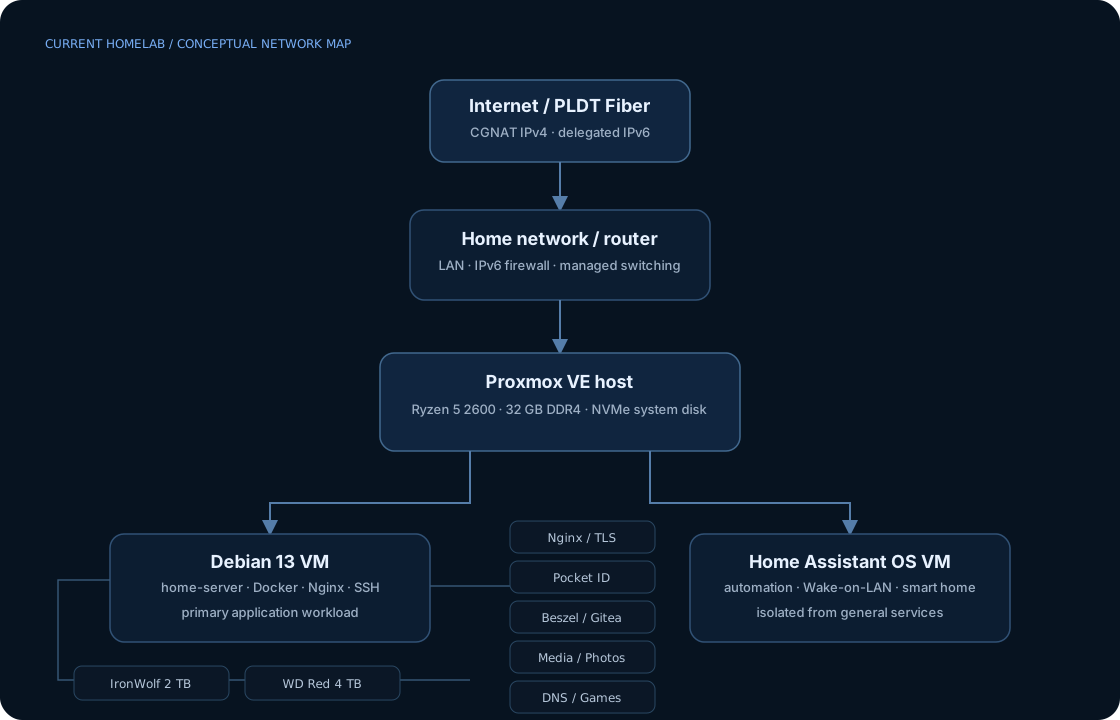
The current setup is centered on a Proxmox VE host. A Debian 13 VM carries the general server workload while Home Assistant OS stays isolated in its own VM. Bulk data lives on dedicated NAS-class hard drives rather than being mixed into the VM system disk.
Why I moved to virtualization
Running everything directly on one Linux install works until the machine becomes both infrastructure and experiment. Moving the host role to Proxmox gave me a cleaner boundary: the hypervisor owns compute and VM lifecycle; Debian owns general services; Home Assistant gets its own appliance-style VM.
The benefit is less about “having a hypervisor” and more about reducing blast radius. I can reboot, resize, snapshot, or replace one workload without treating the entire server as one indivisible machine.
What I actually operate
The Debian VM runs the services I use day to day: reverse proxying, identity, monitoring, Git, documents, photos, media, DNS, VPN tooling, and Minecraft servers. Some workloads are boring until something goes wrong, which is exactly why they’re useful learning environments.
- Identity: Pocket ID and OIDC-aware services.
- Observability: Beszel plus service/system logs.
- Media & data: Jellyfin, Navidrome, Immich, Paperless-ngx.
- Developer tooling: Gitea, SSH, Docker Compose, Nginx.
- Network services: AdGuard Home, WireGuard/Tailscale-style private access, IPv6-aware reverse proxying.
Problems that taught me more than setup guides
1. Storage disappeared after the Proxmox migration
Moving Debian from bare metal into a VM changed who owned the physical disks. The drives existing on the host did not mean the guest could magically see them. That forced me to reason about the boundary between hypervisor storage, VM virtual disks, and device passthrough/mount strategy.
2. IPv6 made “port forwarding” the wrong mental model
With globally routed IPv6, the service already had a globally routable address. The real control point was inbound firewall policy and the application listener, not NAT. Debugging it meant checking address assignment, router firewall behavior, DNS AAAA records, and whether Nginx was listening on IPv6.
ip -6 addr show scope global
ss -tlnp | grep :443
dig AAAA service.example.com
curl -6 -vk https://service.example.com/
3. A 404 that was really permissions
A static asset existed in the expected Nginx web root but still returned 404. The useful lesson was to stop staring at the URI and test the filesystem path as the web-server user: directory traversal permissions can make an existing file effectively nonexistent to Nginx.
How I think about changes
I prefer small, reversible changes with a way to verify each layer. For Nginx that means testing configuration before reload. For networking it means checking local listeners before blaming DNS. For storage it means understanding which layer owns the device before changing mounts.
sudo nginx -t && sudo systemctl reload nginx
systemctl status <service>
journalctl -u <service> --since today
ss -tulpn
What I’d improve next
The next meaningful upgrades are network segmentation, cleaner infrastructure-as-code for repeatable service deployment, stronger backup verification, and more deliberate alerting. I’m more interested in making the environment recoverable and understandable than endlessly adding services.